
Shipping a Slack Catering Bot on AWS Lambda: Three Pivots I Didn't See Coming
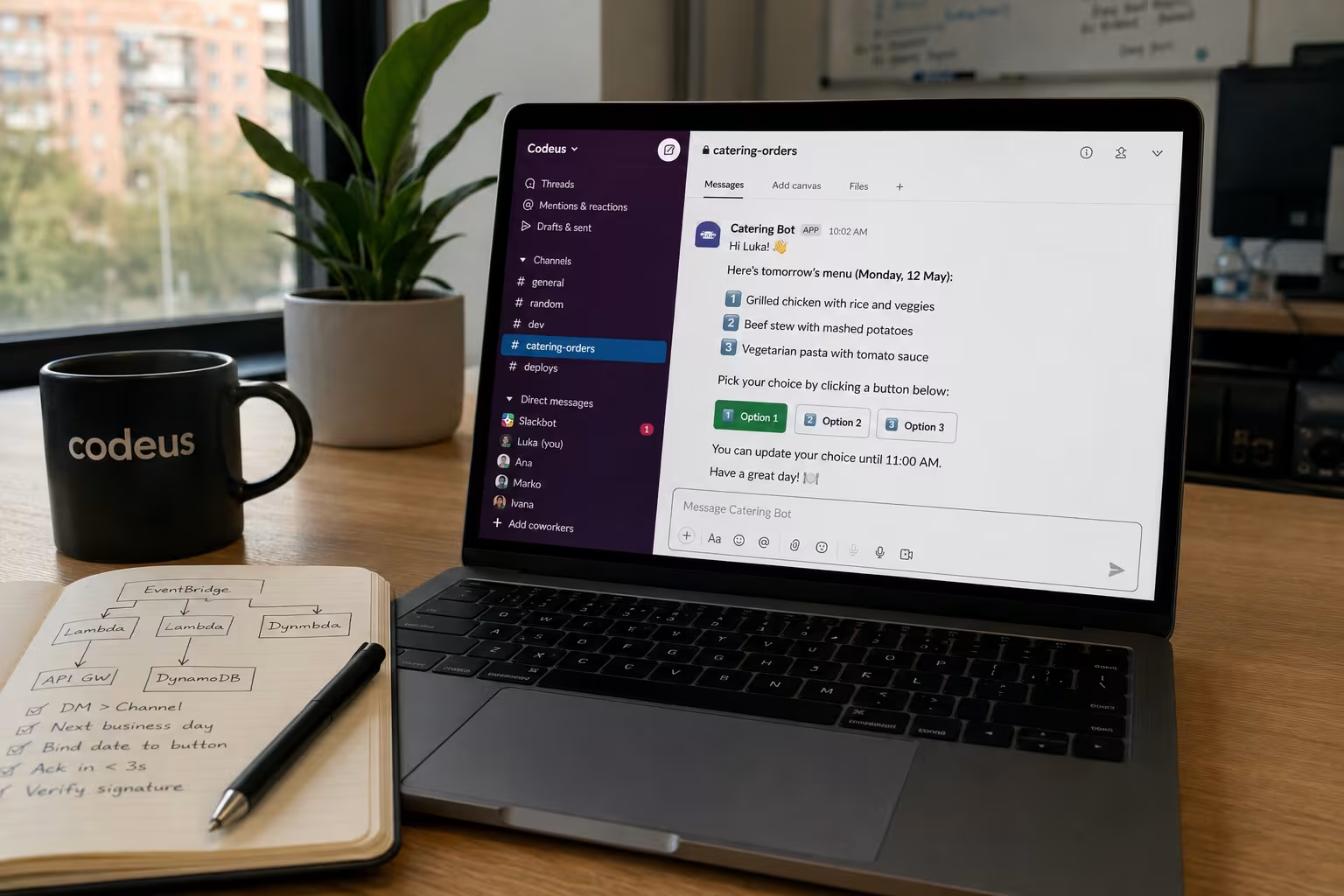
Why a five-minute manual task is worth automating: the attention cost
Every working day at our office in Podgorica went the same way. Someone screenshots the catering company's weekly menu off Instagram, drops it in #catering-orders. People react with 1️⃣ 2️⃣ 3️⃣ and leave correction threads. Around 11:00, that same person tallies the reactions and pastes a clean order into a Viber chat.
Five to ten minutes a day, 220 times a year. The cost isn't really time — it's attention. Attention is the expensive one.
So I gave myself a week to ship a Slack catering bot on AWS Lambda. It went live. What I didn't expect: the AI part — OCR-ing a menu image — was the easy part. The hard parts were small, architectural, and obvious only in hindsight. Three of them changed the design substantially.
Here's the story of those pivots, plus the retry bug that briefly doubled my Anthropic bill.
Architecture: what the final system looks like
Before the pivots, here's where things landed:
SATURDAY 10:00 CET (Central European Time)
EventBridge → saturday_reminder → DM admin ("Upload menu screenshot")
Admin sends image → API Gateway → image_upload_handler → Claude Vision → DynamoDB

SUN–THU 10:00 CET
EventBridge → daily_notifier → DM every employee with interactive buttons
Employee clicks → API Gateway → interaction_handler → DynamoDB

MON–FRI 11:30 CET
EventBridge → order_compiler → structured + plain-text summary → admin channel
The stack:
- Python 3.12 on AWS Lambda. Six functions, same
src/directory, packaged via AWS SAM (Serverless Application Model). - DynamoDB. Two tables:
catering-menuskeyed by ISO week (2026-W12),catering-orderskeyed by(order_date, employee_id). - API Gateway.
/slack/events,/slack/interactions,/slack/commands/menu. - Slack Block Kit for interactive DMs.
- Anthropic Messages API with
claude-sonnet-4-20250514and a vision payload. No SDK — justrequests.postto/v1/messages.
Total monthly cost at our usage (one office, ~15 people, ~20 menu uploads, ~300 orders per month):
| Service | Monthly cost |
|---|---|
| Anthropic Vision (one extraction per week) | ~€0.50 |
| AWS Lambda invocations | €0.00 (free tier) |
| DynamoDB | €0.00 (free tier) |
| API Gateway | €0.00 (free tier) |
| CloudWatch | ~€0.05 |
| Total | ~€0.60–€0.90 |
The dominant cost is the AI extraction. Everything else is rounding error. AWS Lambda's free tier covers 1 million requests and 400,000 GB-seconds per month — more than enough for an office bot.
Pivot #1: Why personal DMs beat channel posts for per-user state
The short answer: when the state being collected is per-person — your order, your reminder, your private choice — use Slack DMs, not channel posts. Channel posts create social pressure, notification noise, and identity-mapping complexity.
The obvious first design: post tomorrow's menu in #catering-orders, people click their choice, handler records it. The channel already existed. Everyone was already there.
Two days of internal testing killed it. When a menu lands in a channel:
- It gets buried. Slack notifications stack. People who muted the channel miss it entirely.
- It creates social pressure. If you see three people picked the steak, you're nudged toward the steak. That's not what the bot is for.
- The channel gets noisy. Every confirmation, every ephemeral message, every state update clutters the feed.
The fix: daily_notifier fans out a personal DM to every member of the channel. The channel becomes a membership list — join #catering-orders to opt in, but you never see catering-bot messages there. Everything happens in DMs.
def fetch_channel_members(channel_id: str) -> list[str]:
    members: list[str] = []
    cursor: str | None = None
    while True:
        params = {"channel": channel_id, "limit": 200}
        if cursor:
            params["cursor"] = cursor
        data = slack_get("conversations.members", params)
        members.extend(data.get("members", []))
        cursor = data.get("response_metadata", {}).get("next_cursor") or None
        if not cursor:
            break
    return members
Two side effects I didn't anticipate, both useful:
- Identity is free. The interaction payload carries the user's Slack ID. No more mapping "which reaction was Marko's."
- Confirmations can do more. Rewriting a DM in-place via
response_urlworks cleanly. In a channel, the same pattern would leak state to everyone.
Pivot #2: Why same-day ordering doesn't fit a kitchen's clock
The short answer: don't anchor your data model on today. A catering kitchen preps the night before based on a count — design your scheduling to match, not your code.
The original schedule made sense on paper:
| Time | Action |
|---|---|
| Mon–Fri 10:00 | Post today's menu, open ordering |
| Mon–Fri 11:30 | Compile and send to catering |
| 12:00–13:00 | Lunch arrives |
That's a 30-minute window between order receipt and first delivery. A catering kitchen doesn't cook fifteen meals across three options in 30 minutes — they prep the night before based on a count.
Obvious in hindsight. Easy to miss while building because the whole data model was anchored on today: current_week_id(), today_day_name(), today_date_str().
The fix was a parallel set of helpers anchored on the next business day:
def next_business_day() -> datetime:
    d = now_cet()
    weekday = d.weekday()
    if weekday < 4:          # Mon–Thu → tomorrow
        return d + timedelta(days=1)
    else:                    # Fri/Sat/Sun → next Monday
        return d + timedelta(days=(7 - weekday))
The notifier moved to Sun–Thu at 10:00. The compiler stayed at Mon–Fri 11:30 but now reads orders placed the day before.
Why you should bind dates to button payloads, not to clocks
One subtle trap: button values. Slack buttons carry a pipe-delimited value string — date|meal_index|meal_description. The target date has to live in the button, not be inferred from now() at click time. A user who gets the DM Sunday night and clicks at 00:05 Monday should still be updating Monday's order, not Tuesday's.
# Building the button
"value": f"{date_str}|{i}|{option}"   # date bound at send time

# Handling the click
order_date, meal_index, meal_description = value.split("|", 2)
orders_table.put_item(Item={
    "order_date": order_date,   # what the button said, not "today"
    ...
})
Small detail. Carries the entire correctness model.
Pivot #3: Why Instagram is not your API — and what to do instead
The short answer: the Instagram Graph API only lets you read media for accounts you own or that have explicitly authorized your app via Business OAuth. If you need a third-party's content, move the input boundary instead: have a human paste the data into your tool.
The cleverest part of the original design was also the most fragile. The catering company posts a photo of the weekly menu to Instagram every Sunday. My plan: Saturday Lambda hits the Instagram Graph API, grabs the latest post, downloads the image, sends it to Claude Vision, parses JSON, writes to DynamoDB.
It worked in dev against my own test account. Then I pointed it at the catering company's account.
The Graph API only lets you read media for accounts you own or that have explicitly authorized your app via Business OAuth. Facebook's Basic Display API — the thing I half-remembered — was deprecated in 2024. The catering company was never going to grant a Slack bot OAuth access to their Instagram. Scraping the public profile is fragile, rate-limited, and a TOS violation waiting to happen.
So I changed the input.
The Saturday Lambda now sends the admin a DM:
📸 Reminder — menu upload time!
Time to upload the weekly menu for 2026-W12. Just drop a screenshot of the Instagram post here in the chat and I'll process it automatically. 🍽️
The admin screenshots the menu, drops it in the DM. A Slack Events API webhook fires, image_upload_handler picks it up, verifies the sender is ADMIN_USER_ID, downloads the file from Slack's CDN with the bot token, base64-encodes it, and sends it to the same Claude Vision pipeline I'd already built:
payload = {
    "model": "claude-sonnet-4-20250514",
    "max_tokens": 2000,
    "messages": [{
        "role": "user",
        "content": [
            {"type": "image", "source": {
                "type": "base64",
                "media_type": media_type,
                "data": b64_image,
            }},
            {"type": "text", "text": EXTRACTION_PROMPT},
        ],
    }],
}
The model returns structured JSON keyed by day name. The bot replies with the parsed result so the admin can eyeball it before it goes live.
Two things worth internalizing here.
The AI win never lived in the source. I'd attached value to "auto-scrape Instagram" as if the fetch was the impressive part. The actually impressive part — turning a photograph of a handwritten-ish menu into clean structured JSON — was Claude Vision regardless of how the image arrived. Moving the input from Graph API to "human drops a screenshot in a DM" lost nothing.
Every external dependency is a future outage. Even if the Graph API path had worked, I'd be one TOS change or OAuth deprecation away from a midweek incident. The "human uploads once a week" path has one failure mode: the human forgets. The bot already DMs them Saturday morning to prevent it.
Side benefit: INSTAGRAM_ACCESS_TOKEN and INSTAGRAM_USER_ID are gone from the environment. Blast radius shrank.
The retry bug that doubled my Anthropic bill
The short answer: if a Slack webhook handler exceeds 3 seconds, Slack retries up to three times. On Lambda, each retry is a fresh invocation and a fresh paid Anthropic call. Check for X-Slack-Retry-Num at the top of the handler and short-circuit duplicates immediately.
A few days after launch I noticed admin DMs were being acknowledged twice — sometimes three times. DynamoDB was fine (idempotent put_item on week_id), but the bot was replying "Received your image, processing…" multiple times per upload. CloudWatch confirmed: Claude Vision was firing multiple times per image.
How Slack's 3-second retry rule breaks long-running Lambda handlers
The Slack Events API contract is clear if you read it carefully:
Slack expects an HTTP 200 OK within 3 seconds of delivery. If it doesn't receive one, the event is retried, up to three times with exponential backoff.
A Claude Vision call on a real menu image takes 8–15 seconds. My handler was running the full pipeline before returning 200. Slack would retry at 3 seconds, then again, then again — each retry spawning a fresh Lambda invocation with the same image, each invocation paying for a fresh Anthropic call. 2–3× the API cost on every upload.
The correct fix is acknowledge-then-process: return 200 immediately, hand the work off to SQS or an async Lambda invoke. That's the version for the next pass.
The pragmatic fix, shipped the same evening:
def handler(event, context):
    # Slack retries events if we don't respond within 3s.
    # Acknowledge retries immediately — they're duplicates.
    headers = event.get("headers", {})
    retry_num = headers.get("x-slack-retry-num") or headers.get("X-Slack-Retry-Num")
    if retry_num:
        logger.info(f"Ignoring Slack retry #{retry_num}")
        return {"statusCode": 200, "body": "OK"}
    # ... rest of handler
If Slack sets X-Slack-Retry-Num, the request is a duplicate of something already in flight. Swallow it, return 200, move on.
This is "good enough" not "correct." A truly correct version would store Slack's event_id as an idempotency key and reject by that. The retry-num check is one header inspection and ships in a single deploy.
Security and deployment notes
Verifying Slack requests
Every request from Slack carries an X-Slack-Signature header and an X-Slack-Request-Timestamp. The handler rejects anything older than 5 minutes (replay protection) and verifies the HMAC-SHA256 of the raw request body against the app's signing secret. Without this, the endpoint is a public POST handler that anyone can call.
import hashlib
import hmac
import time

def verify_slack_signature(headers: dict, raw_body: bytes, signing_secret: str) -> bool:
    timestamp = headers.get("X-Slack-Request-Timestamp", "")

    # Reject requests older than 5 minutes
    if abs(time.time() - int(timestamp)) > 300:
        return False

    sig_basestring = f"v0:{timestamp}:{raw_body.decode('utf-8')}"
    expected = "v0=" + hmac.new(
        signing_secret.encode(),
        sig_basestring.encode(),
        hashlib.sha256
    ).hexdigest()

    return hmac.compare_digest(expected, headers.get("X-Slack-Signature", ""))
This runs before any business logic. If it fails, return 403 immediately.
Bot token scopes
The bot only requests what it actually needs:
| Scope | Why |
|---|---|
chat:write | Post messages and DMs |
im:write | Open DM channels |
users:read | Resolve user display names |
conversations.members | Fetch channel membership |
files:read | Download the uploaded menu image |
Nothing more. Smaller scope means smaller blast radius if the token leaks.
Admin verification
The image_upload_handler checks event['user'] == ADMIN_USER_ID before doing anything else. The signing-secret check protects against forged requests from outside Slack. The admin-user check protects against any teammate accidentally triggering a menu upload by dropping an image in the wrong DM.
Two layers, two different attack surfaces covered.
Deployment
The whole project is a single template.yaml. Six AWS::Serverless::Function resources point at the same src/ directory with different Handler: values and their own EventBridge or API Gateway triggers. One command ships everything:
sam build && sam deploy --guided   # first time
sam build && sam deploy            # subsequent deploys
Environment variables (SLACK_BOT_TOKEN, SLACK_SIGNING_SECRET, ADMIN_USER_ID, ANTHROPIC_API_KEY) live in AWS Systems Manager Parameter Store and are pulled in via the SAM template — never hardcoded, never in source control.
Five engineering lessons from shipping a Slack bot in a week
The AI was not the hard part. I budgeted the most time for Claude Vision and prompt engineering. Both were done in maybe two hours total. The rest went to state machines, retries, week-vs-business-day arithmetic, and which Slack surface carries which kind of message. None of it is glamorous. All of it is where bugs live.
Move the input boundary before you write a clever client. The Instagram scraper felt clever because the input was already public and structured. It was also one Meta policy update from breaking. Once I moved the boundary to "admin sends a DM," the pipeline that used to depend on Instagram now depends on Slack — which I was already depending on. Fewer surfaces, fewer failures.
DMs beat channels for personal flows. If a piece of state is per-person — your order, your reminder, your private decision — it belongs in a DM. Channels are for shared context. Mixing them creates friction you can't put your finger on until you remove it.
Bind dates to buttons, not clocks. If a click means "tomorrow's order," the date lives in the button value, not in now(). Anything else creates bugs that hit you exactly when users are least patient.
Read the 3-second contract. Slack, Stripe, Twilio — every webhook platform with a retry policy has a deadline in single-digit seconds. If your work is slower, acknowledge first, process second. "I'll just be quick about it" gets paid for in duplicate side effects and inflated bills.
FAQ
Why did Slack retry my webhook three times? Slack expects an HTTP 200 OK within 3 seconds of event delivery. If your handler takes longer — a Claude Vision call on a real image runs 8–15 seconds — Slack assumes the event failed and retries up to three times with exponential backoff. Each retry spawns a fresh Lambda invocation. See the Slack Events API docs for the full contract.
How do I handle long-running work in a Slack event handler?
Acknowledge first, process second. Return 200 immediately, then hand the work to SQS or invoke a worker Lambda asynchronously. As a same-day fix, inspect the X-Slack-Retry-Num header and short-circuit retries: if it's set, the request is a duplicate of work already in flight.
Can I read a third party's Instagram posts via the Graph API? No. The Graph API only exposes media for accounts your app owns or that have authorized you via Business OAuth. The older Basic Display API was deprecated in 2024. For third-party content, change the input boundary: have a human paste a screenshot into your tool instead.
Should orders be tied to today's date or to a button payload?
Bind the date to the button payload at send time. If a user clicks at 00:05 on Monday after getting the DM Sunday night, you want them to update Monday's order, not Tuesday's. Inferring the date from now() at click time is a correctness bug waiting to happen.
How much does running a Slack bot like this on AWS Lambda cost? Under a euro a month for an office of ~15 people. AWS Lambda, DynamoDB, and API Gateway all sit comfortably inside the AWS free tier at this volume. The only real cost is the Anthropic Vision call — roughly €0.50/month for one menu extraction per week. Total comes to €0.60–€0.90/month.
What alternatives did you consider?Slack's Bolt framework would have handled some of the Slack plumbing, but the Lambda packaging story is cleaner without it at this scale. Slack Workflow Builder can't do image processing or DynamoDB writes. Zapier doesn't have the flexibility for the business-day scheduling logic. Raw Lambda + requests kept the blast radius small.
How do you secure the bot token and signing secret? Both live in AWS Systems Manager Parameter Store, referenced in the SAM template. They're never in source control or Lambda environment variables directly. The signing secret is used to verify every inbound Slack request via HMAC-SHA256 before any handler logic runs.
The bot has been running for a couple of months. The team's morning Slack is quieter. The person who used to compile orders no longer does that. The catering company gets a clean, copy-pasteable message every weekday at 11:30. The Anthropic bill, post-fix, is under a euro a month.
The real win is that nobody thinks about lunch ordering anymore. For an internal tool, that's the only success metric that matters.